Secure File Deletion — Configurable Overwrite Passes
Drop the files you want gone onto MiniMax Converter's Secure delete tool, pick how many overwrite passes you want (1, 3, 7, or 35 — the Gutmann method), and the tool overwrites + unlinks. Important caveat: on SSDs and copy-on-write filesystems, overwrite-in-place is not guaranteed to physically destroy the original bits. The tool tells you this honestly.
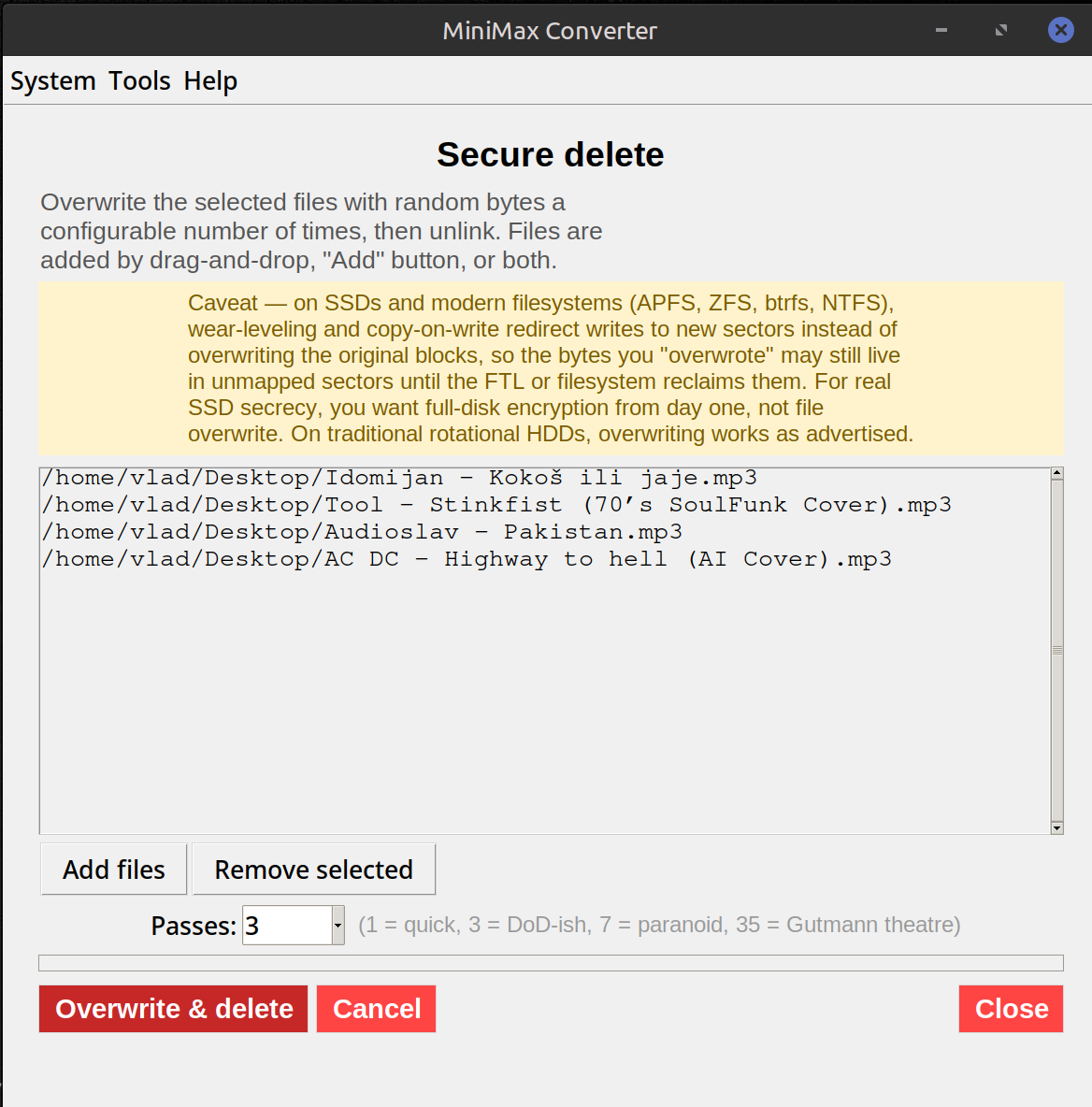
How to use it
- Open Tools → Files & Folders → Secure delete.
- Drop the files (or folder) you want to delete.
- Pick the pass count: 1 (one overwrite — fast, fine for HDDs against casual recovery), 3 (DoD 5220.22-M), 7 (DoD extended), 35 (Gutmann — slow and overkill).
- Confirm. The tool overwrites + unlinks each file. Progress bar shows aggregate progress; cancellable.
The SSD / COW caveat
On a spinning HDD, overwriting a sector physically writes new bits over the old ones. On an SSD with wear-leveling, the overwrite is sent to a different physical cell and the original cell is marked for garbage collection but the bits may still be physically present for hours / days. On a copy-on-write filesystem (Btrfs, ZFS, APFS) the original blocks remain reachable from snapshots. For SSD-level guarantees, use full-disk encryption from day one and then "secure delete" by destroying the encryption key.
When this tool helps anyway
Against casual file-recovery (Recuva, PhotoRec, undelete tools), a single-pass overwrite is enough — the recovery tools look for the original file in unallocated space; if the space has been overwritten, even once, they cannot recover it. Against state-level forensics on an SSD, no software-only tool is sufficient.
Questions and answers
Why does it have a yellow warning banner?
Because the tool can't fix SSD / copy-on-write limits — those are filesystem-level facts. Better to tell you up front than over-promise.
Is the Gutmann 35-pass method actually useful?
Not really, in 2026. It was designed for pre-2001 hard drive encodings. 1-3 passes on a modern HDD is enough. On SSDs, no pass count helps.
What's the alternative for SSDs?
Full-disk encryption from day one (LUKS on Linux, BitLocker on Windows, FileVault on macOS). To "delete" the data, destroy the encryption key. Or physically destroy the drive.
Can I undelete after this?
No — that's the point. Confirm twice before clicking.
Related tools
Get MiniMax Converter
Cross-platform desktop app. Linux free for non-commercial use; Windows & macOS one-time €20 license. No subscription, no telemetry, no account.