Audio Spectrogram + Transcode Detector
Drop any audio file and MiniMax Converter shows a Spek-style spectrogram (frequency vs time, color-coded heatmap) plus the file's claimed bitrate and the actually measured high-frequency cutoff. The classic catch: a file that claims 320 kbps but has a brick-wall cutoff at 14 kHz — that's a transcode from a much-lower-bitrate source. The verdict line tells you in plain English: lossless, real high-bitrate, transcoded from lower, or heavy transcode.
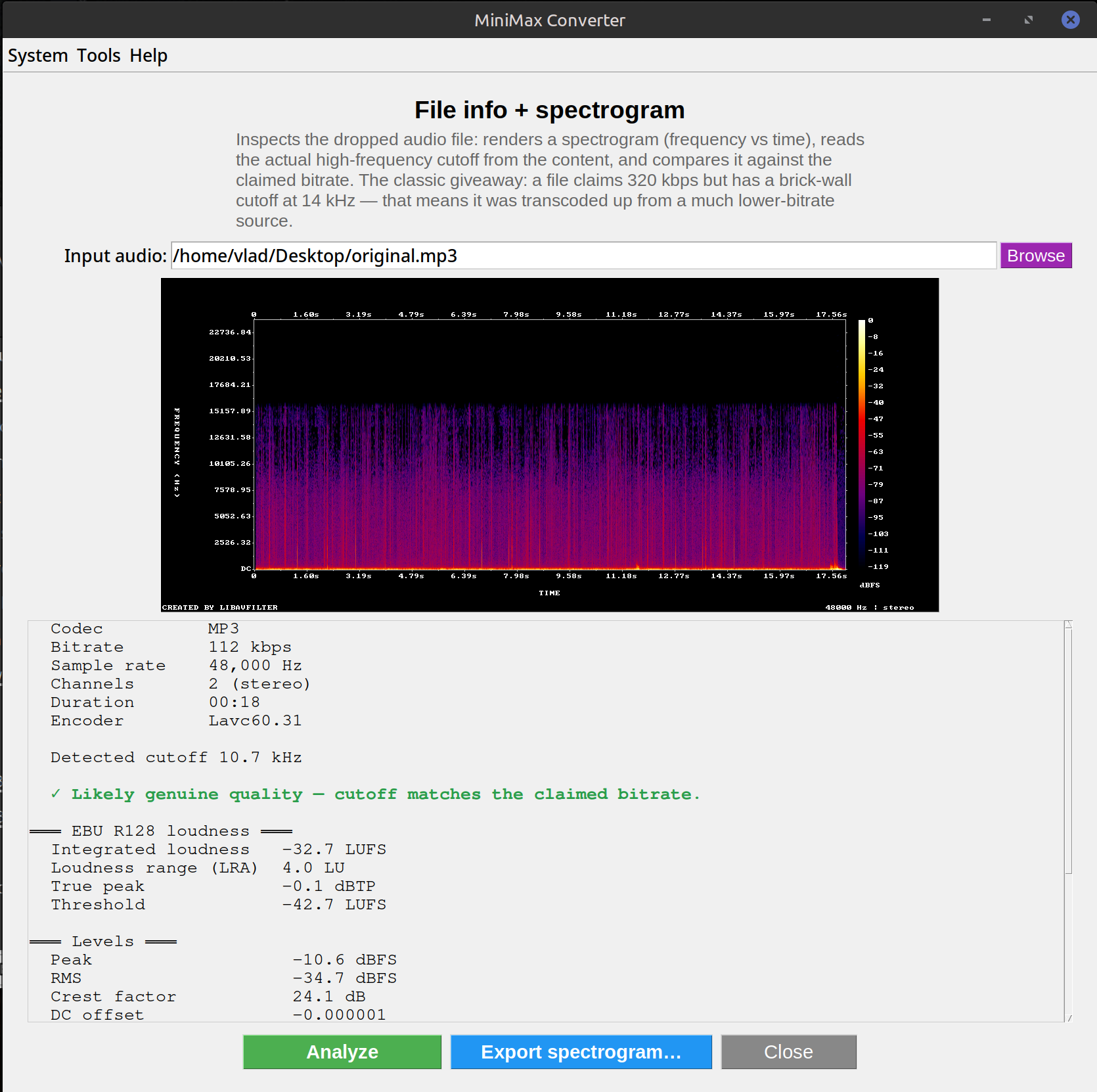
What the spectrogram shows
The X axis is time, Y axis is frequency (20 Hz at the bottom to 22 kHz at the top), color is energy at that frequency at that time. CD-quality audio has content up to ~20 kHz. A 320 kbps MP3 cuts off around 20 kHz. A 192 kbps MP3 cuts off around 19 kHz. A 128 kbps MP3 cuts off around 16 kHz. A "transcoded" file — one re-encoded from a lower-bitrate source — has a sharp brick-wall cutoff at whatever the original's cutoff was, regardless of the new container's claimed bitrate.
How to use it
- Open Tools → Audio → Info (or drop an audio file and pick Info from the More menu).
- The screen shows: file header info (codec, claimed bitrate, sample rate, channels, duration, encoder tag), spectrogram (color heatmap), and a verdict line.
- Look at the spectrogram's top edge. If it's a hard horizontal line well below 20 kHz, the file has been transcoded down at some point.
- The verdict line summarises: "Lossless format — no transcoding concern" / "Real high-bitrate" / "Likely transcoded from lower bitrate than claimed" / "Heavy transcode".
Why this matters
Buying a "320 kbps MP3" from a sketchy source often means getting a transcode of a 128 kbps source — claimed 320 with all the size of 320 but the audio quality of 128. Cassette or vinyl rips sometimes get encoded at 256 kbps but the source itself only had useful content to ~15 kHz, so the higher bitrate is wasted. Spectrogram analysis is the only way to tell — file headers can lie, but the frequency content can't.
Questions and answers
How long does the analysis take?
2-3 seconds for a song-length file. Most of the time is decoding the audio; the spectrogram FFT is fast.
Does it work on FLAC / WAV / lossless formats?
Yes — and the verdict short-circuits to "Lossless format — no transcoding concern" because lossless can't hide a transcode (the cutoff would still show). Useful for verifying lossless rips are genuinely lossless.
How does it compare to Spek (the standalone tool)?
Same idea, packaged into the main app. Spek is a single-purpose visualiser; MiniMax adds the verdict and the transcode-detection logic.
What about Opus / AAC / Vorbis — do they have similar artefacts?
Yes, though the cutoff is less brick-wall and more gradual. Modern lossy codecs (Opus, AAC) are smarter about which frequencies to discard. The tool accounts for codec-specific behaviour in the verdict.
Related tools
Get MiniMax Converter
Cross-platform desktop app. Linux free for non-commercial use; Windows & macOS one-time €20 license. No subscription, no telemetry, no account.