TLS Certificate Inspector — Live Host Cert Details
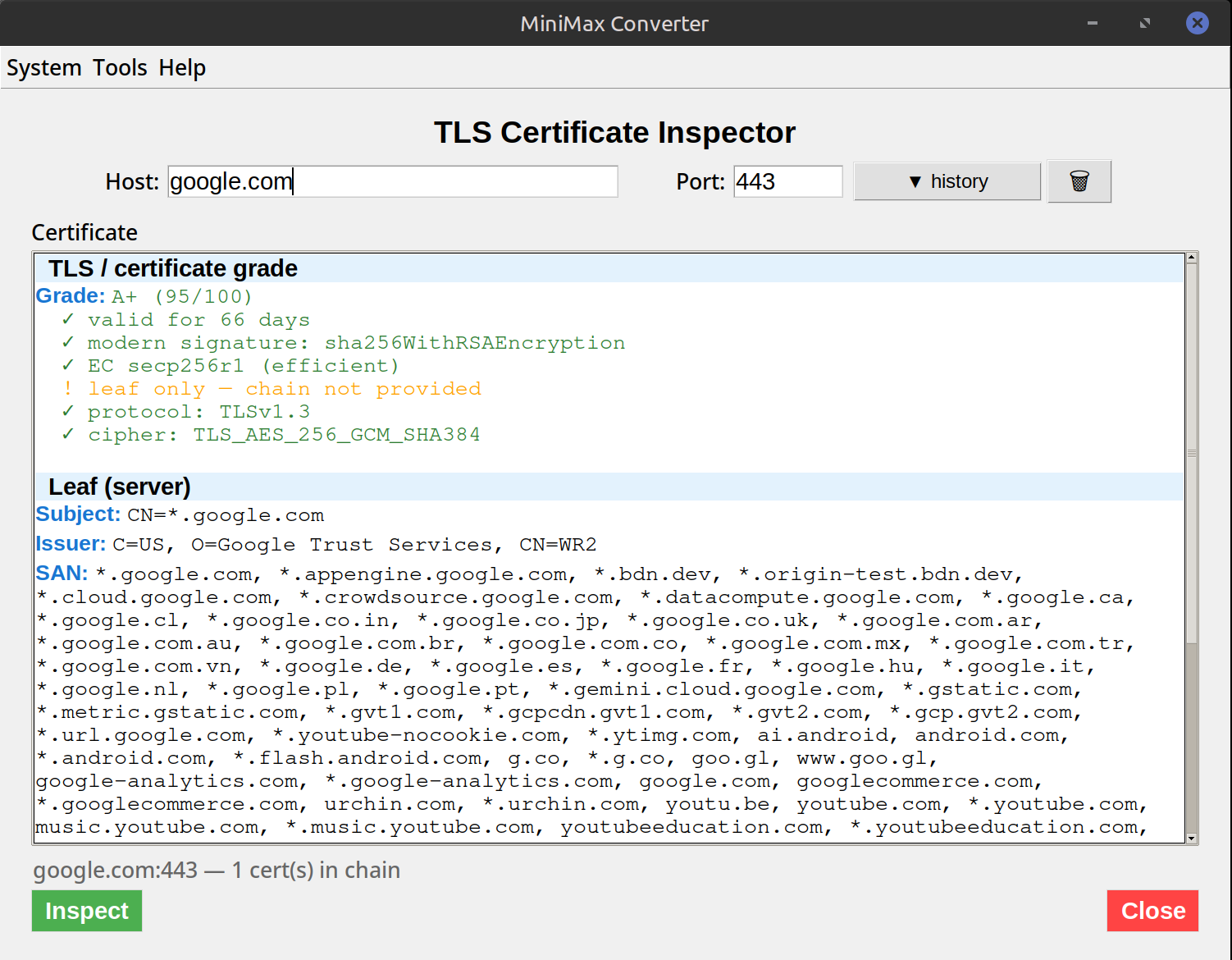
Type any host:port (or just a hostname for HTTPS default 443) and MiniMax Converter connects, retrieves the TLS certificate chain, and shows every detail: subject, issuer, validity period, Subject Alternative Names, signature algorithm, key type and size, full chain to a trusted root, plus any anomalies (expired, hostname mismatch, weak algorithm, broken chain). Offline tool — no third-party SSL checker required.
What you can see
For each certificate in the chain: CN + SANs (which hostnames this cert covers), Issuer (which CA signed it), Not Before / Not After (validity window), Signature algorithm (SHA-256 RSA, etc.), Public key type (RSA 2048, ECDSA P-256, …), Serial number, Extensions (Key Usage, EKU, AIA, CRL distribution, OCSP). Plus the full chain — leaf → intermediate(s) → root.
How to use it
- Open Tools → Network → TLS Certificate Inspector.
- Enter a host. Defaults to port 443 (HTTPS); add
:portfor non-standard ports (e.g.:8443,:993for IMAPS,:587with STARTTLS for mail). - Click Fetch. The cert chain is shown — leaf cert on top, intermediates below, root at the bottom.
- Click any cert to see its full details. The tool flags issues: expired, expiring soon, weak signature, hostname mismatch.
Common anomalies to watch for
Hostname mismatch: the cert's CN/SAN doesn't include the hostname you connected to. Browser shows a warning, your service is broken. Expired or expiring soon: obvious but easy to miss without monitoring. Broken chain: intermediates not served by the host — most browsers will fix this via AIA but some clients (some Java versions, some embedded devices) won't. Weak algorithm: SHA-1 signed cert (most browsers reject these now) or RSA < 2048 bits.
Questions and answers
How does this compare to checking ssllabs.com?
SSL Labs does much deeper analysis (cipher suites, protocols, known vulnerabilities). MiniMax is faster and focuses on the cert itself. Use SSL Labs for deep audit; use this for daily inspection.
Can I inspect a local .pem / .crt file?
Yes — there's also "Inspect from file" mode (Tools → Certificates → Inspect → View certificate info) for inspecting cert files locally.
What about STARTTLS protocols (SMTP, IMAP)?
Supported. Pick the protocol in the connection settings (SMTP STARTTLS on 587, IMAP STARTTLS on 143, etc.). The tool issues the STARTTLS command before grabbing the cert.
Does it verify the cert against the system trust store?
Yes — the chain trust path is verified and reported. A self-signed or untrusted-CA cert is shown but flagged as "not trusted by system store".
Related tools
Get MiniMax Converter
Cross-platform desktop app. Linux free for non-commercial use; Windows & macOS one-time €20 license. No subscription, no telemetry, no account.