HTTP Header Inspector — See What Servers Are Sending
Type any URL and MiniMax Converter sends a request, follows redirects, and shows every HTTP header in the request and response — plus cookies, security headers (HSTS, CSP, X-Frame-Options), caching directives, and the final URL after redirects. Useful for debugging redirect loops, checking security headers, inspecting cookies, or understanding why a CDN is doing what it's doing.
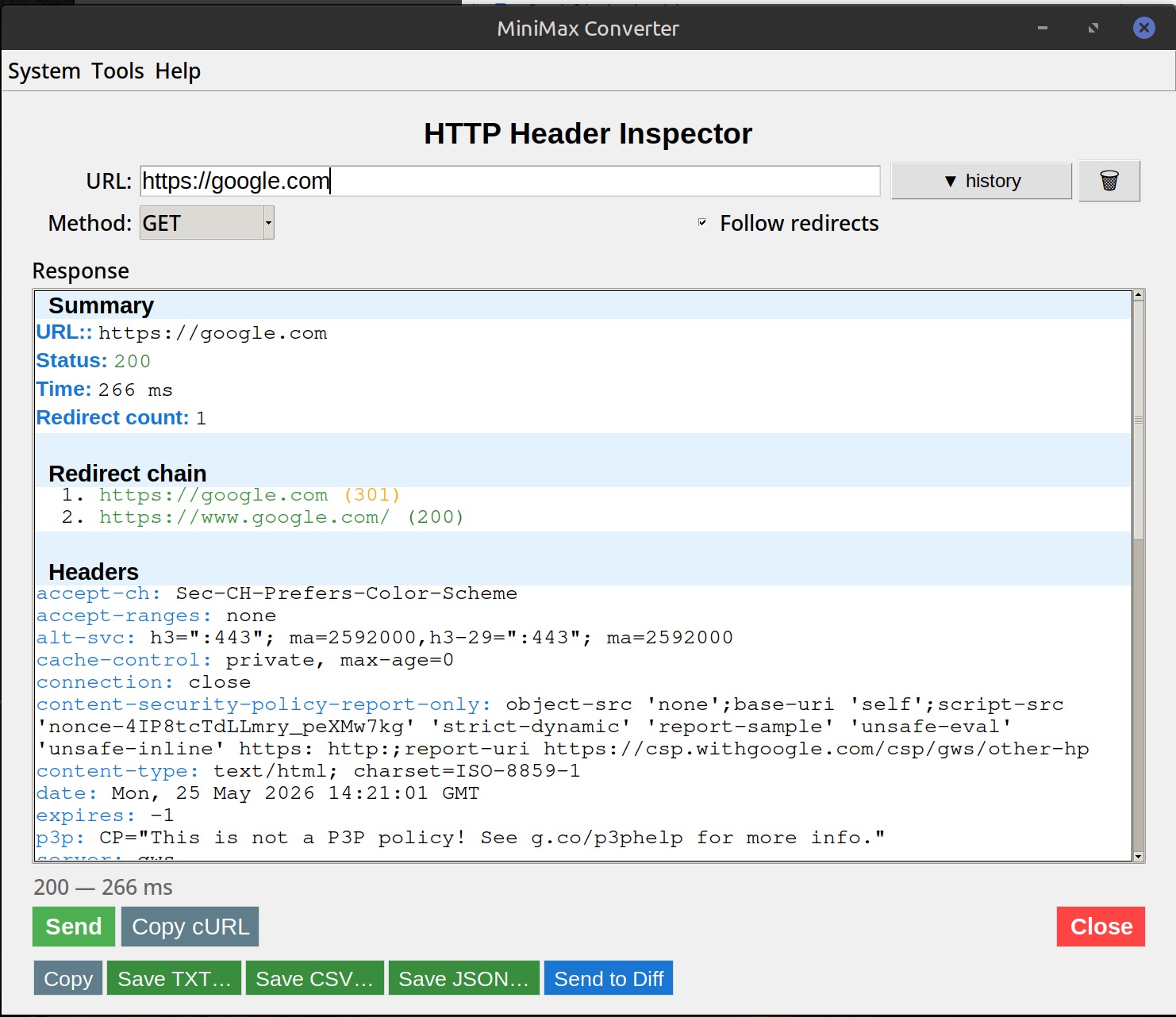
What you can see
Request headers the tool sent (User-Agent, Accept, etc. — configurable). Response headers: status code, content-type, content-length, server, cache-control, etag, last-modified, set-cookie. Security headers: HSTS, CSP, X-Frame-Options, X-Content-Type-Options, Referrer-Policy — flagged when missing. Redirect chain: every 301/302 hop with its Location header. Cookies: name, value, domain, path, secure/HTTPOnly/SameSite flags.
How to use it
- Open Tools → Network → HTTP Header Inspector.
- Paste a URL.
- Pick method: GET / HEAD / POST / OPTIONS. HEAD is the default (no response body — fast).
- Optional: add custom request headers (e.g.
Authorization: Bearer ...) or a custom User-Agent. - Click Fetch. The full redirect chain + final response headers are shown.
Common uses
Debug redirect loops: see exactly where the chain is looping. Verify HTTPS migration: after deploying HTTP→HTTPS redirects, check that the chain looks right and HSTS is set. Cache investigation: see Cache-Control, ETag, Last-Modified — figure out why a resource is or isn't being cached. Cookie debugging: all Set-Cookie headers + flags visible. Security audit: CSP, HSTS, X-Frame-Options either present or missing — checked at a glance.
Questions and answers
Does it execute JavaScript or render the page?
No — pure HTTP. The page's HTML is fetched but not parsed/executed. For real browser-style inspection, use Chrome DevTools.
Can I set a custom User-Agent?
Yes — useful for testing how a site responds to different browsers, mobile UAs, or bots.
What about HTTP/2 or HTTP/3?
HTTP/2 supported. HTTP/3 (QUIC) is a separate protocol stack — the tool uses HTTP/1.1 or HTTP/2 depending on what the server negotiates.
How does this compare to curl -I?
Same purpose, GUI instead of CLI. Plus the redirect-chain visualization + security-header flagging.
Related tools
Get MiniMax Converter
Cross-platform desktop app. Linux free for non-commercial use; Windows & macOS one-time €20 license. No subscription, no telemetry, no account.