Strong Password Generator
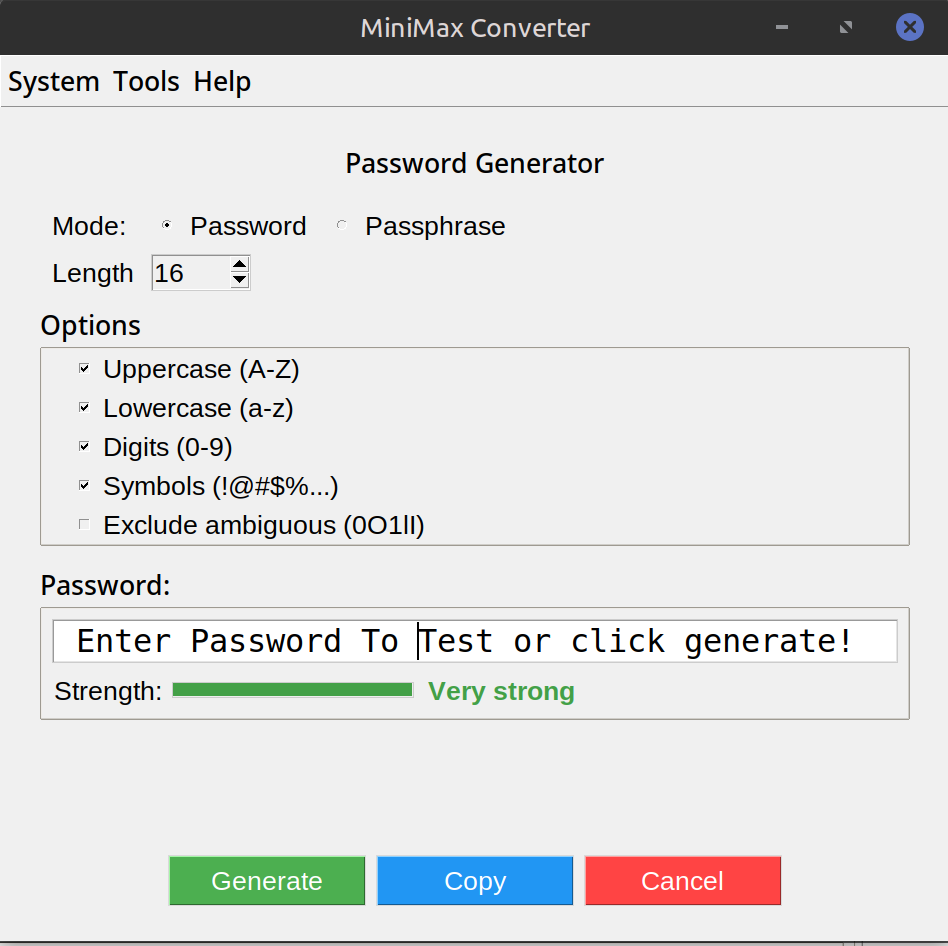
Generate strong, random passwords on your own machine. MiniMax Converter's password generator gives you full control over length (8 to 128 chars), character sets (uppercase, lowercase, digits, symbols, ambiguous chars excluded), and shows a live strength meter for each generated password. Bulk mode for generating 10-1000 at once. Pronounceable mode if you need to actually remember it.
What makes a password strong
Two factors: length and randomness. A 12-character random password from a 90-character alphabet has ~78 bits of entropy — strong. A 20-character one is essentially uncrackable for the foreseeable future. "Strong" memorable passwords (with predictable substitutions like P@ssw0rd) are weak; modern crackers test those patterns first. Random is the only way.
How to use it
- Open Tools → Security & Cryptography → Password generator.
- Set length (default 16 — strong for most uses; 20+ for high-value accounts).
- Pick character sets. Default: upper + lower + digits + symbols. Exclude any that your target system rejects.
- Optional: exclude ambiguous chars (0/O, 1/l/I) for hand-typed passwords.
- Click Generate. Strength meter shows entropy bits. Click again for a fresh one.
- Bulk mode: enter count, get a list of N passwords. Export as CSV.
Pronounceable mode for things you must remember
When a password manager isn't available (BIOS password, encrypted backup, etc.), pronounceable passwords are easier to remember and still strong. Alternating consonant/vowel patterns give 30-50 bits of entropy per 8 chars — weaker than fully random but acceptable when length compensates. Pick 4-5 word combinations from the diceware list for the strongest memorable option.
Questions and answers
Is it really random?
Yes — uses your OS's cryptographically secure random source (urandom / CryptGenRandom). Not predictable, not seedable from outside.
How long should my password be?
For master passwords / passphrases: 20+ chars random, or 5-6 random words. For everything else: 16 chars random, stored in a password manager.
What about emoji passwords?
Many systems don't handle Unicode passwords reliably. Stick to printable ASCII for compatibility.
Should I include symbols?
Yes — increases the alphabet size, more entropy per character. Some legacy systems reject symbols; exclude them only when forced to.
Related tools
Get MiniMax Converter
Cross-platform desktop app. Linux free for non-commercial use; Windows & macOS one-time €20 license. No subscription, no telemetry, no account.